Replyf is a Chrome extension for Gmail that generates AI email replies in the tone of the inbox you're replying from — your client's or your executive's. It works by analyzing sent emails in that inbox to learn vocabulary, greeting style, and sign-off patterns, then applies that style to every reply. It also reads the full email thread for context, drafts a send-ready reply in seconds, and runs inside Gmail so there is no tab-switching. Built specifically for virtual assistants and executive assistants who reply on someone else's behalf. Free plan available with 10 replies per month. No credit card required.
Replyf: Draft Client Emails in Their Tone — Not Yours
A Gmail Chrome extension built for virtual assistants and executive assistants. Replyf learns your client's writing tone, reads the full email thread for context, and drafts a send-ready reply in seconds. Right inside Gmail, no tab-switching.
10 AI replies + 1 tone profile setup, completely free. Handle one client end-to-end before you decide.
No credit card required to start. Upgrade only when you like your first result.
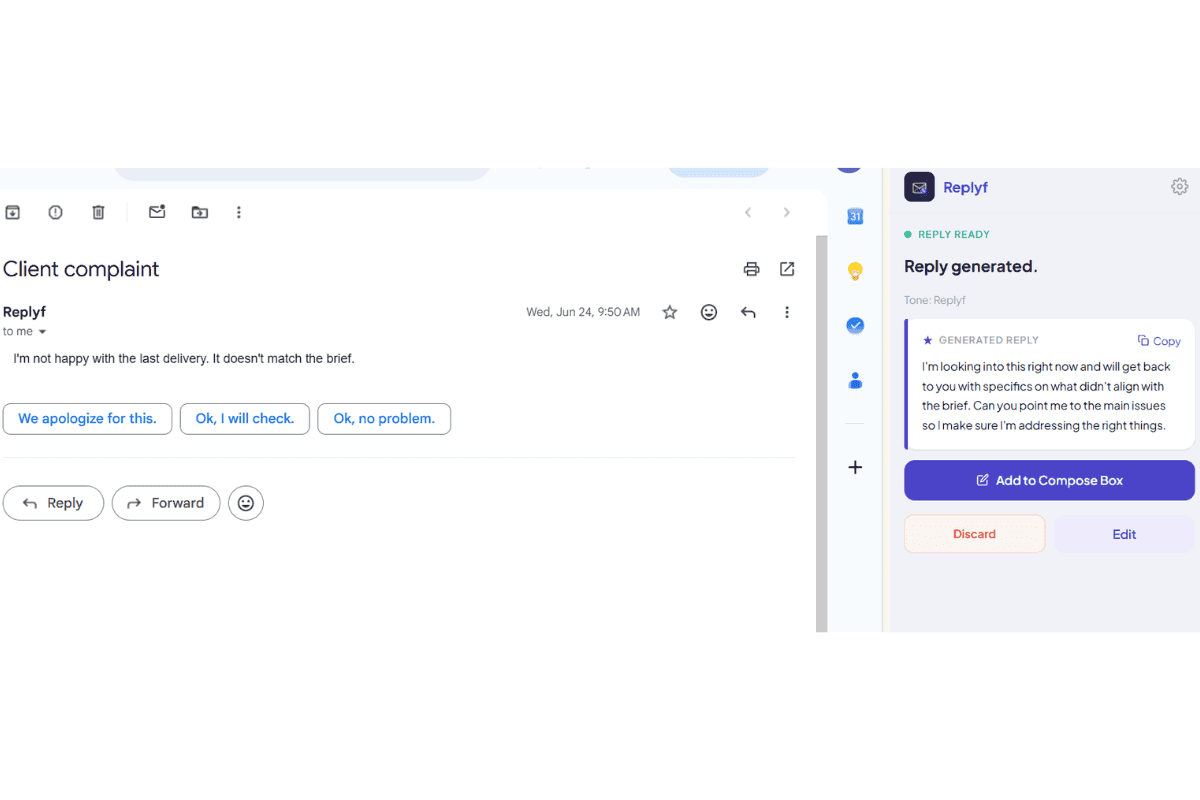
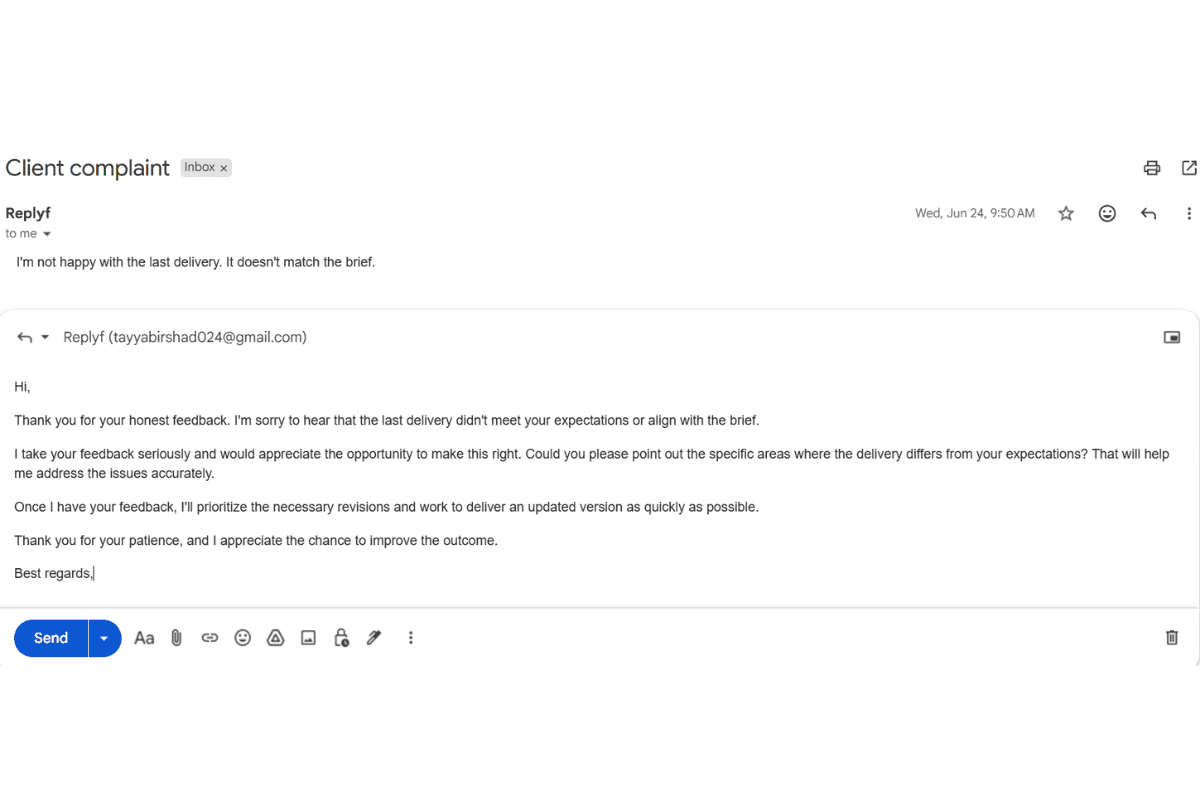
Drag the slider to compare. Same email, two very different replies.
What is Replyf?
Replyf is a Gmail Chrome extension that generates AI email replies in your client's writing tone. Instead of the generic professional voice general AI writing tools produce, Replyf learns each client's voice from a small sample of their real sent emails, reads the full Gmail thread for context, and drafts a send-ready reply inside Gmail in seconds.
It's built specifically for virtual assistants and executive assistants who reply to email on someone else's behalf. If you're managing multiple client inboxes or supporting a busy executive, Replyf handles the tone-matching part automatically so every reply sounds like the specific person whose inbox it's coming from, not the AI and not you.
Emails are read locally in your browser and never stored on our servers. Only a short plain-text style summary is saved as your client's tone profile. Free plan includes 10 AI replies per month and one tone profile setup, no credit card required.
The Walkthrough Begins
AI Email Reply Generator
Draft, personalize, and send Gmail replies in seconds with advanced AI tone matching. Replyf is the intelligent Chrome extension that generates send-ready email replies in your client's exact tone, using the full thread as context.
Explore Our AI Email Tools
Every inbox you support gets its own workflow. Pick the tool that matches the job and see what it does in seconds.
AI Email Reply Generator
Draft send-ready Gmail replies in seconds using full-thread context
AI Client Tone Matcher
Learn a client's writing tone from their real sent emails
Multi-Client Inbox Manager
Separate tone profiles for every client, switch in one click
Email Management for VAs & EAs
The full Replyf toolkit built around the VA and EA workflow
See Replyf write, right inside your inbox
No copying threads into a chatbot. No second tab. Replyf sits next to Gmail's reply button and reads the whole conversation before it drafts a single word.
- Never stores or saves your client emails on external servers
- Reads the full thread, not just the last message, before drafting
- Generates and sends replies without leaving the Gmail tab
0
Emails ever stored
Full
Thread context read
Inline
No tab switching
Client Tone Profile
LearnedSample emails analyzed from the inbox you reply from
Learns your client's tone, not yours
Most AI tools write the same flat reply for everyone — and that reply sounds like the AI, not your client. Replyf studies the emails already sent from that inbox and writes the way your client actually writes — greetings, phrasing, and sign-offs included.
- Trained on 3-5 emails already sent from that inbox — no copy-pasting needed
- No prompting required, ever. Just hit generate
- Add a one-line custom instruction whenever you need extra control
3-5
Sample emails to learn
<2 min
One-time setup
0
Prompting required
Why Generic AI Email Tools Don't Work for VAs & EAs
You're not slow. Replying in someone else's voice all day is the hard part.
You manage 3 inboxes — and they all sound different
Your clients expect replies in their voice, not yours. Juggling tones for multiple bosses is exhausting and error-prone.
Generic AI drafts embarrass you in front of your client
Your client reads that draft and knows it's AI. Now they question whether you're actually on top of things.
You spend more time editing AI replies than writing them
ChatGPT gives you a starting point. You spend 5 minutes fixing the tone, removing filler, and making it sound human. Replyf skips that step.
How Our Gmail AI Extension Works in 3 Steps
Turn a client email thread into a personalized reply in seconds.
Open a Gmail thread
Select any client email thread that needs a response. No copy-pasting, no switching tabs.
Generate a personalized draft
Click the Replyf button inside Gmail and it reads the full thread context instantly.
Review and send
Check the draft, make any quick edits, and send a reply that sounds like the client — not you.
Trusted by early VAs and EAs replying in their client's voice
Five-star reviews from real Chrome Web Store users, not testimonials we wrote. Every number below comes from the actual reviews.
Rhea Amor Falcasantos
Jun 8, 2026
“Replyf can help with my email responses for my clients or other businesses. This is a great opportunity for everyone who needs the work done efficiently. Thanks Tayyab Irshad founder of Replyf.”
Okwuosa Chinolum
Jun 8, 2026
“great extension! it makes replying emails much faster and helps me write clear, professional messages with very little effort. simple to use and saves alot of time.”
Chisom Ahamefule
Jun 1, 2026
“Smooth, great and amazing to use. Love it”
Nmesomachi Kanu
May 31, 2026
“I tested your reply generator software. I used it as a chrome extension and created my tone. Then I went ahead to open an existing mail to see what Replyf.app will bring up. I must say, this is impressive.”
Timothy Takeuchi
May 31, 2026
“Saves a lot of time and crafts emails quickly. Highly recommend”
Why Choose Replyf
The AI email tool built around the VA and EA workflow
General AI writing tools weren't built for people replying on someone else's behalf. Replyf was.
Written in your client's actual tone
Every reply is drafted from a tone profile built out of your client's real sent emails — greeting style, sentence length, sign-off. Not a generic AI voice, not your voice. Theirs.
Reads the full email thread for you
Replyf pulls the whole thread as context automatically. No copy-pasting into a chat window, no lost context, no drafts that ignore what you already agreed to three emails ago.
Runs inside Gmail. Zero tab-switching.
Open the thread, click generate, get a draft in seconds. Same tab, same window, same context. On a 30-reply day, cutting out the switching saves more time than the drafting itself.
Emails read locally, never stored
Your client's email content is processed in your browser to draft the reply, then discarded. We store only a short plain-text style summary as the tone profile — never the emails themselves.
Pricing Questions
What counts as one AI reply?
Every time you click the Replyf button to generate a response counts as 1 reply. Your reply count resets every month on your billing date, and unused replies do not carry over.
Can I upgrade, downgrade, or cancel my plan?
Yes. Change or cancel anytime from your account dashboard. Upgrades take effect immediately. Downgrades apply on your next billing date. No questions asked, no annual lock-in.
Frequently Asked Questions About Replyf
Learn how Replyf works, what makes it different from generic AI email tools, and why VAs and EAs use it to reply in their client's voice.
What is Replyf?
How is Replyf different from ChatGPT, Gemini, or Copilot?
How does Replyf learn my client's writing tone?
Does it read the full email thread, or just the last message?
Can I manage multiple clients with separate tones?
Is my client's email data safe?
Can I try Replyf before paying?
Can I give Replyf specific instructions for one reply?
Does Replyf work with Google Workspace accounts?
Which browsers and devices does Replyf run on?
How do I reply to emails on behalf of my client without making it obvious someone else is responding?
What is the most efficient way to manage email inboxes for multiple clients at the same time?
What is the difference between Google Workspace add-ons and Chrome extensions for virtual assistant Gmail workflows?
Stop editing generic AI drafts. Start sending replies that actually sound like your client.
10 replies and 1 tone profile setup, completely free. No credit card required. Upgrade only when you like your first result.