The Email Management Tool Built for Virtual Assistants and Executive Assistants
Replyf is a Gmail Chrome extension for people who reply to email on someone else's behalf. Set up a separate tone profile for each client or executive you support. Let the extension read the full thread for context, and draft a send-ready reply in seconds. Everything runs right inside Gmail, no tab-switching.
- One extension for every client or executive inbox you manage
- Separate tone profile per person, so voices never blend
- Reads the full email thread automatically for real context
- Runs inside Gmail, no copy-paste, no second tab
- Emails are read locally and never stored
- Free plan available with 10 replies per month, no credit card required
First 10 AI replies free every month. No credit card required.
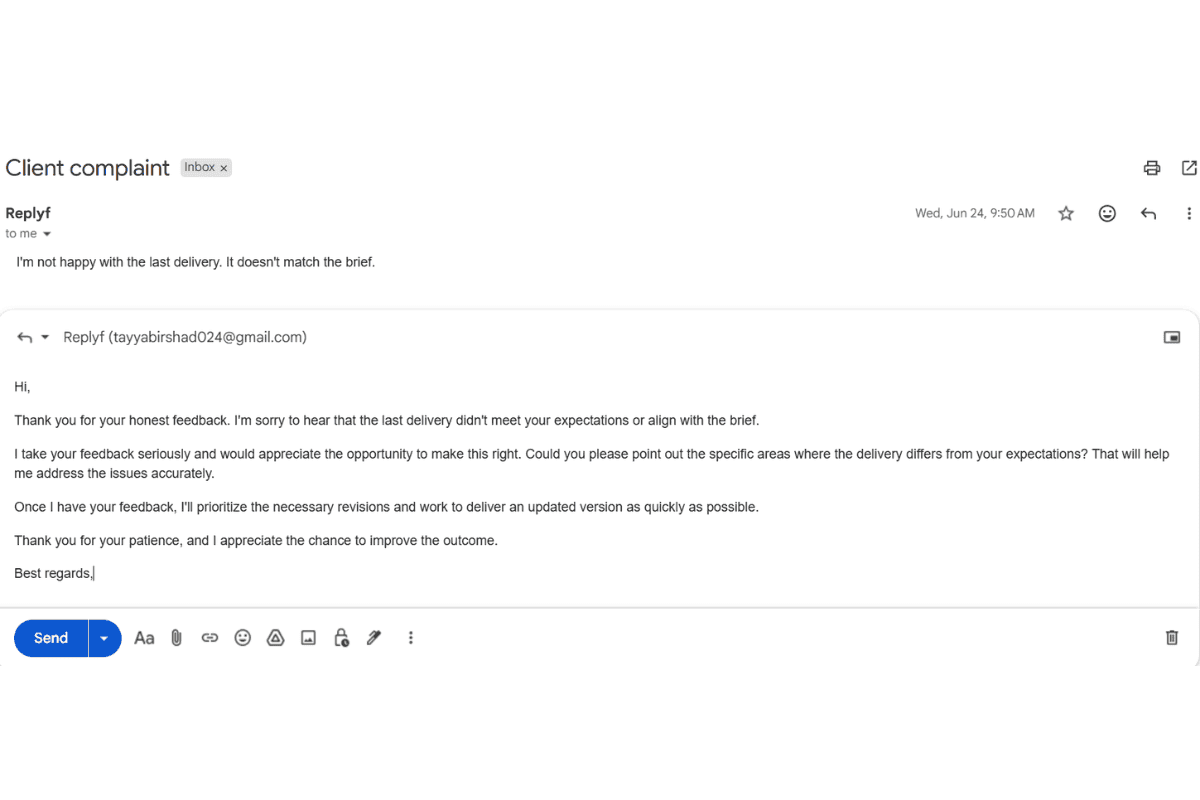
A generic AI reply, same flat tone regardless of which client inbox it's used in.
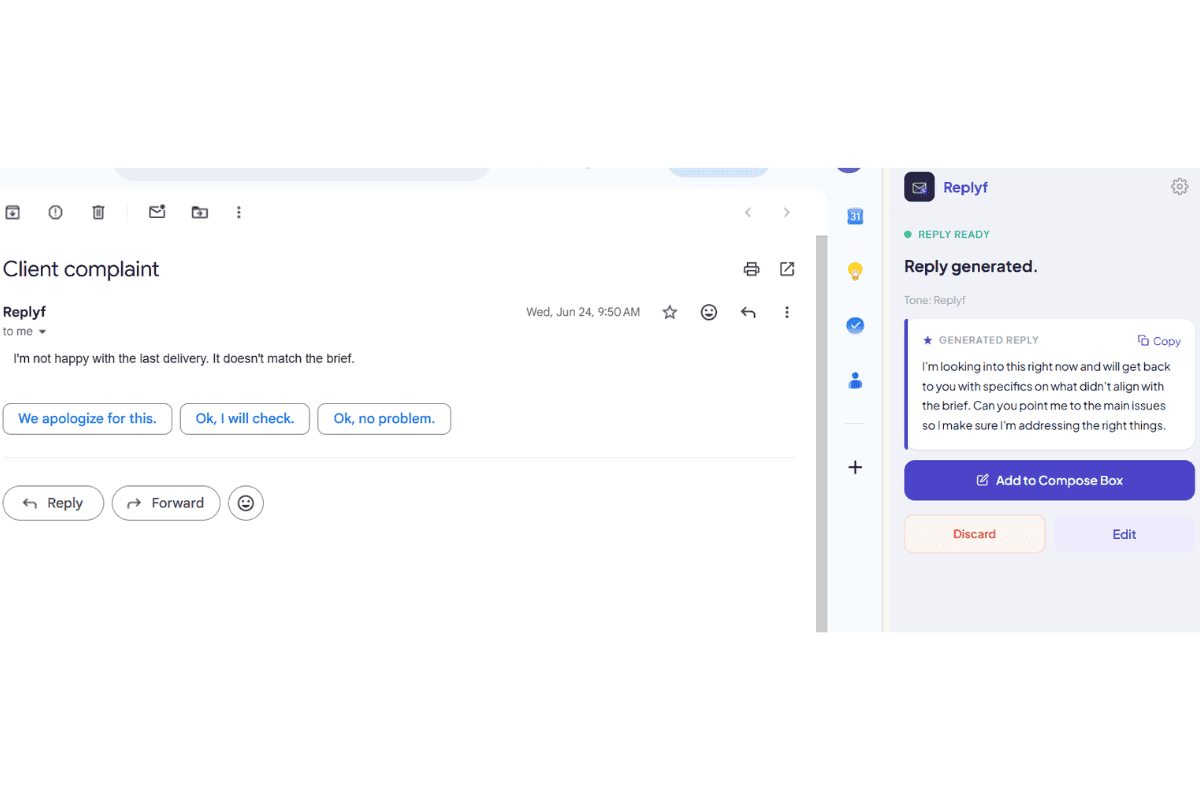
Replyf inside Gmail, drafting in the client's actual tone with the correct profile selected.
Why VAs and EAs Need a Different Kind of Email Tool
Most email tools assume one person is replying from their own inbox in their own voice. That is the exact opposite of what a virtual assistant or executive assistant does. If you support even one client, every reply you send has to sound like them, respect the earlier context in the thread, and go out fast enough to keep the client's response times looking healthy. If you support three or four clients, all of that has to happen without you ever accidentally sending Client A's voice to Client B's contacts.
Generic email management software is built for organizing inboxes: labels, filters, shared views, assignment rules. That is useful, but it does not solve the actual writing problem. Replyf is built around the writing part specifically: whose voice this reply needs to be in, and how to get to a send-ready draft without spending twenty minutes editing a generic AI output first.
The result is a tool that fits the way VAs and EAs already work, instead of asking you to change your workflow to fit the tool.
Who Uses This Tool
VAs running a full client roster
Virtual assistants supporting 3-8 clients at once who need to keep each voice, calendar, and thread context straight without the mental cost that used to make email the hardest part of the day.
EAs supporting a founder or CEO
Executive assistants whose exec's contacts know exactly how the exec sounds, so drafts that read like a corporate template get noticed instantly.
Agencies and OBM teams
Small agencies and online business managers running email as a productized service across many clients, where consistency matters more than any individual reply.
How It Works — 4 Steps
Install the Chrome Extension
Add Replyf from the Chrome Web Store in about 30 seconds. It runs inside Gmail, no separate app to open, no tab to switch to.
Sign In and Set Up Your First Tone Profile
Sign in, then point Replyf at 3-5 real sent emails from your client's or executive's Gmail account. It reads them locally and builds a tone profile in under 2 minutes.
Repeat for Each Client You Support
Set up a separate tone profile for every person you reply on behalf of. Starter includes 8 profiles, Pro includes 20, Unlimited includes 60.
Open a Thread, Pick the Profile, Click Generate
Inside any Gmail thread, choose which client's tone to use and click generate. Replyf reads the whole thread and drafts a send-ready reply in that voice. Review, edit if needed, send.
Pro Tips for Better Results
Set up tone profiles the day you take on a new client, do it once, and every future reply is faster.
If a client sounds different with different audiences (formal to vendors, casual internally), create two profiles instead of averaging them.
Use the custom-instruction field for one-off edge cases (e.g. 'shorter than usual', 'defer the meeting request') without changing the profile itself.
Frequently Asked Questions
What is email management software for virtual assistants?
Email management software for virtual assistants is any tool that helps a VA handle their client's email more efficiently. There are three broad categories: organizational tools (labels, filters, folders — usually Gmail's built-in features are enough), delegation tools (Gmail's official delegate access feature for sharing an inbox safely), and reply-writing tools (tone matchers like Replyf that draft replies in the client's voice). Most VAs supporting multiple clients use one from each category. Replyf sits in the third category, purpose-built for replying on someone else's behalf in the correct client tone.
How is Replyf different from general email management software?
Traditional email management tools focus on organizing the inbox, filters, labels, shared views. Replyf focuses on the writing side: sounding like the right person, with the right context from the thread, in the right amount of time. Most VAs and EAs run both: one for organization, Replyf for actually replying.
Do I need Gmail delegate access to use Replyf on a client's inbox?
No. Replyf works with however you already access the inbox, through your own Google Workspace delegate access, or by being logged into the client's Gmail account directly. It reads whichever thread you have open in that Chrome window.
How many client inboxes can one Replyf account handle?
Starter includes 8 tone profiles, Pro includes 20, and Unlimited includes 60. Pick the plan that matches how many people you reply on behalf of, not just how many total inboxes you touch, a single client might have several inboxes but only one voice.
Is it safe to use on a client's confidential email thread?
Emails are read locally by the extension to generate the reply, then discarded. The only thing Replyf saves is a short plain-text style summary that makes up the tone profile, never the actual email content, and nothing is used to train any AI model.
Can I try Replyf on a real client inbox before paying?
Yes. The free plan gives you 10 replies per month and 1 tone profile with no credit card required. That is enough to set up a real client tone profile and try it on real threads before deciding whether to upgrade.
Does it support both personal Gmail and Google Workspace?
Yes. Replyf works with both personal Gmail and Google Workspace accounts, including any client Workspace inbox you have legitimate access to.
Further Reading
More on how VAs and EAs use Replyf and Gmail together.
The Best Email Management Software for VAs and EAs
The three categories of email tools every VA and EA should know, and what each one is actually for.
Read more →
How to Delegate Gmail Access to a VA (Safely)
Google's official delegate access feature, step-by-step setup, and what to review after.
Read more →
Managing Multiple Client Inboxes Without Losing Your Mind
Practical daily system for VAs supporting three or more clients at once.
Read more →
5 Email Habits Every Executive Assistant Should Build
The daily habits that keep senior executives' inboxes flowing without missed threads.
Read more →
Ready to Try It?
10 free AI replies every month. No credit card required to install.