Best AI Email Assistants for 2026, Compared Honestly
By Replyf Team · May 17, 2026 · 8 min read
Article Contents
- Why VAs and EAs Try General AI Tools First
- What We Tested
- It Is Not Just About Tone. Thread Context Matters Too.
- Speed and the Hidden Cost of Tab-Switching
- The Data-Handling Angle
- So Which Tool Should You Actually Use?
- Individual Tool Breakdown: What Each One Is Actually Good At
- How We Tested Each Tool
- The Verdict by Use Case
Before
A generic AI reply — same flat tone regardless of which client it's for
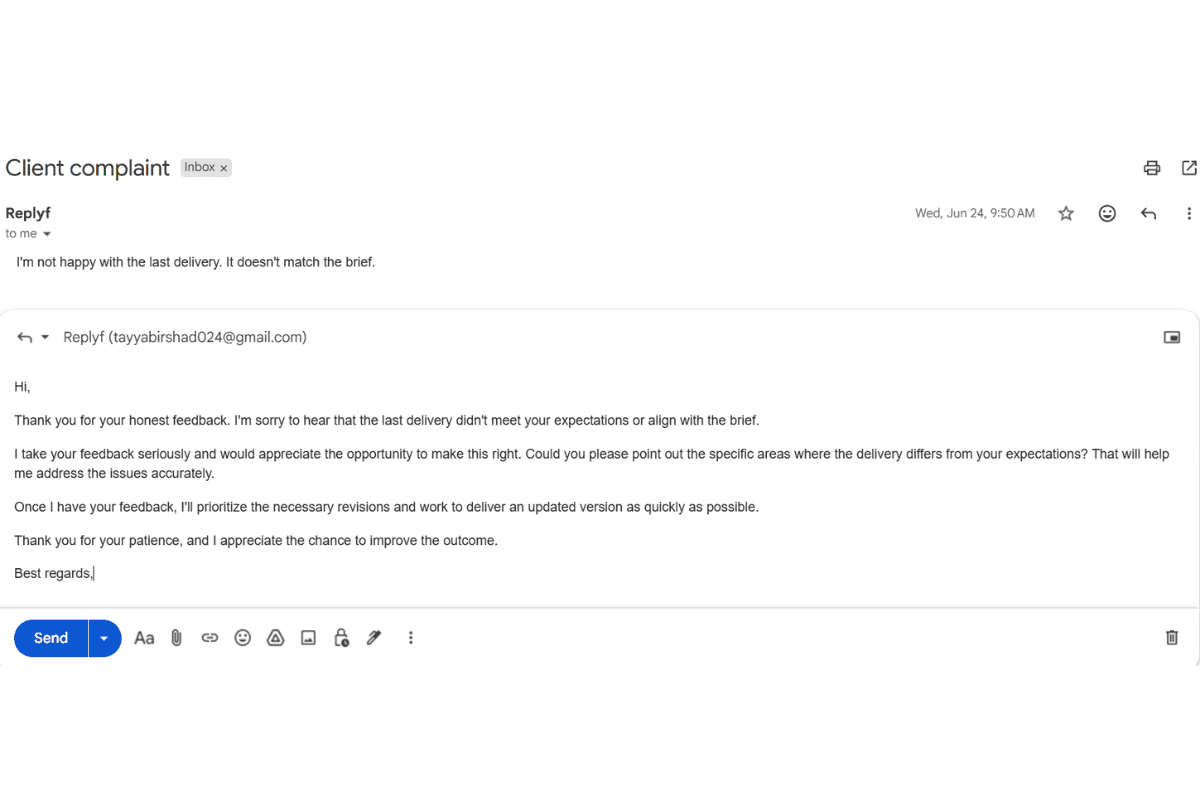
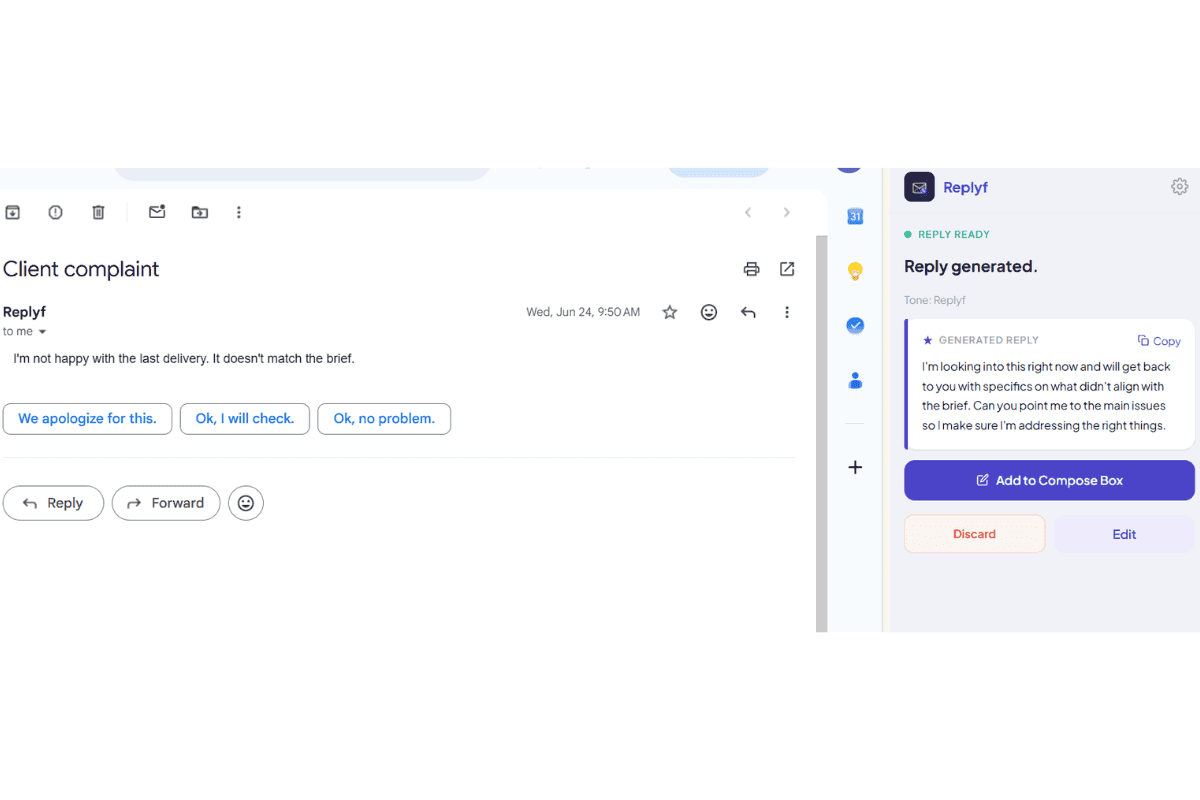
After
Replyf reply inside Gmail — written in the client's actual tone, not a generic one
ChatGPT, Gemini, and Copilot are the three AI writing tools most VAs try first. All three have the same specific blind spot when the job is replying as someone else, and it's not the blind spot most reviews mention.
Why VAs and EAs Try General AI Tools First
If you manage someone else's inbox, you have probably already tried ChatGPT, Gemini, or Copilot to speed up replies. They are free or already included in tools you use, and they write clean English in seconds. So why do VAs and EAs keep coming back saying they still spend most of their time editing?
These tools give you a generic first draft. To get closer to your client's tone you have to prompt them each time with the client's tone, phrasing, and rules, and even then the output leans on typical AI style artifacts (long phrases, em-dashes, quotation marks, and words nobody uses in email). Every reply becomes a back-and-forth of prompting and fixing before it is send-ready. That is fine if you are replying to a friend. It becomes a real problem when you are replying on behalf of a lawyer, a founder, or an executive whose contacts already know how they sound.
What We Tested
We tested all three on the same task: reply to a client follow-up email, in the voice of a specific person, using nothing but a general prompt like "write this in a friendly but professional tone." Every output came back polished but generic, and getting closer required layering more and more instructions into the prompt. Even then the drafts came back with typical AI phrasing that a real reader can spot.
It Is Not Just About Tone. Thread Context Matters Too.
When you paste a single email into ChatGPT and ask for a reply, the AI has no idea what came before it. A client thread almost never starts with the message you are replying to. It has 4, 8, sometimes 20 messages of back-and-forth, prior agreements, and half-answered questions any decent reply needs to respect.
General AI tools cannot see that context unless you paste in the whole thread yourself, every time. Nobody does that, because it is exactly the kind of friction that made you look at AI in the first place. The result is drafts that technically answer the last message but ignore something you already agreed to three emails ago. Replyf reads the full thread automatically from inside Gmail. No pasting, no lost context. This is the AI Email Reply Generator tool's whole design point.
The Data-Handling Angle
There is one more thing worth flagging: general-purpose AI tools process your input on external servers. For a lot of email that is fine. If you are pasting in a client's contract negotiation or an executive's confidential thread, it is worth knowing where that text goes before you paste it. Replyf reads the email locally and never stores the content, which is a different tradeoff than a general-purpose chatbot.
So Which Tool Should You Actually Use?
If you only send the occasional one-off email in your own voice, ChatGPT or Gemini is genuinely fine. The gap only shows up when you are replying as someone else, repeatedly, across multiple people who each sound different, on threads that carry real context from earlier messages. That is the specific job Replyf is built for.
Individual Tool Breakdown: What Each One Is Actually Good At
Each tool has a genuine strength worth noting. Here's where each of the four earns its place, and where it doesn't:
ChatGPT (GPT-4 and later)
Best at: reasoning across long documents, complex instructions, and multi-step workflows. For email specifically, best when you need to explain something technical or nuanced from scratch and don't care about tone matching. Weakest at: sounding like a specific person. Every VA who has tried ChatGPT for client email reports the same pattern: the first draft always contains “I hope this email finds you well,” “Certainly, I'd be happy to,” and other AI-flagship phrases that most clients don't use. Editing tax: high.
Gemini (Google)
Best at: being built into Gmail natively and pulling from your Google account context. For personal email in your own voice, it's quick and integrated. Weakest at: recognizing you might not be the person whose Gmail account you're working in. As a VA using delegate access to a client's Gmail, Gemini treats you as if you were the account owner and defaults to that person's general context, which sometimes helps and sometimes actively works against tone matching.
Microsoft Copilot
Best at: Microsoft ecosystem integration (Outlook, Teams, Word). For anyone doing email in Outlook rather than Gmail, Copilot's draft-in-Outlook flow is genuinely convenient. Weakest at: Gmail workflows. If your client's email is in Gmail (which most VA and EA clients' email is), Copilot isn't solving the workflow. Also carries the same generic-AI-voice problem as ChatGPT and Gemini.
Replyf
Best at: the specific job of replying as someone else, in their voice, inside Gmail. Purpose-built for VAs and EAs, with separate tone profiles per client and thread-aware drafting. Weakest at: things it's not built for. It's not a general chat AI, not a document writer, not an email client. If your job includes lots of non-email AI tasks (writing long documents, analyzing data), you'll still want a general AI tool alongside Replyf.
How We Tested Each Tool
The comparison above and in the table is based on running the same real-world VA task through each tool with a controlled setup. Every tool got the same starting position: a Gmail thread from a real (anonymized) client inbox with a specific reply requirement, plus 5 sample sent emails from that client that could be used to inform the reply. The task: produce a send-ready reply in that client's tone in under 60 seconds.
- ChatGPT (GPT-4): Manually copied the thread and 5 sample emails into a prompt, asked for a reply matching the sample tone. Result: needed 3-5 iterations to get close to the client's voice, plus final editing pass. Total time: 6-8 minutes per reply.
- Gemini (in Gmail): Used the built-in “Help me write” feature with tone instruction. Result: shorter time to draft, but reply defaulted to Gmail's house style regardless of the sample emails. Same editing tax as ChatGPT.
- Copilot (in Outlook, importing the Gmail thread): Similar workflow to Gemini once the thread was imported. Same generic voice problem. Not tested for native Gmail workflow since Copilot doesn't operate there.
- Replyf: One-time tone profile setup from the 5 sample emails (under 2 minutes). After that, click Replyf in Gmail, get a draft in the client's tone, review, send. Total time per reply: under 60 seconds. Editing tax: minimal for routine replies, moderate for complex ones.
The Verdict by Use Case
One tool doesn't fit everyone. Here's who each is genuinely the right pick for:
- You reply as yourself, occasionally, in your own voice → ChatGPT or Gemini free tier. No need for tone matching.
- You reply in Outlook for personal work email → Copilot integration is worth the Microsoft 365 subscription if you already have it.
- You're a VA supporting 1-2 clients occasionally → Replyf free tier (10 replies/month) is enough to test. Upgrade if tone matching helps.
- You're a VA supporting 3+ clients daily, or an EA supporting one busy executive → Replyf paid tier. The workflow tax on prompt-based tools becomes painful at this volume, and the pricing works out cheaper than per-seat alternatives.
- You're an agency handling 10+ client inboxes across a team → Replyf Unlimited ($99/month) or contact for team pricing. Purpose-built at this scale.
ChatGPT vs. Gemini vs. Copilot vs. Replyf for Client Emails
| Factor | ChatGPT / Gemini / Copilot | Replyf |
|---|---|---|
| Built for | Replying as yourself | Replying as someone else |
| Tone source | One prompt you write each time | Learned from that inbox's real sent emails |
| Setup per client | None, same voice every time | One-time, under 2 minutes per client |
| Thread context | Only what you manually paste in | Reads the full Gmail thread automatically |
| Workflow | Copy thread, prompt, copy reply back | Runs inside Gmail, no tab-switching |
| Time per reply | Fast to draft, slow to fix and re-copy | Seconds to send-ready, no re-copy step |
| Data handling | Processed on external servers | Read locally, never stored |
| Multiple clients | Same flat voice for everyone | Separate tone profile per client |
Want every reply to sound like your client, not a robot?
Try Replyf FreeRelated reading
Are You Replying in Your Client's Voice, or Yours?
You use AI to write a draft. Then you spend 10 minutes fixing it because it sounds nothing like your client. Here is why that keeps happening, and the simple fix.
The Best Email Management Software for VAs and EAs in 2026
There is no single best email management software for virtual assistants and executive assistants. There are three categories that solve different parts of the job. Here is what each one is for.
FAQs about Best AI Email Assistants for 2026, Compared Honestly
Everything you need to know
What is the best AI email assistant for virtual assistants in 2026?
For the specific job of replying to email as someone else (client, executive), Replyf is purpose-built for the workflow. For general AI writing tasks (drafting documents, brainstorming, code, analysis), ChatGPT or Claude are more capable. Most VAs end up using a purpose-built tone tool for email plus a general AI tool for everything else, rather than trying to force one tool to do both.
Which AI email assistant is best for executive assistants?
The needs are similar to VAs: reply in the executive's voice, protect their time, handle the volume without workflow overhead. Replyf works for EAs the same way it works for VAs, with the caveat that EAs supporting one executive typically only need one tone profile, so even the Starter tier is enough. See our [best tools for executive assistants roundup](/blog/best-tools-for-executive-assistants) for the fuller EA toolkit including calendar and travel tools.
Is there a free AI email assistant that works for VAs?
Gmail's built-in Smart Reply and Gemini are free but produce generic output that doesn't match a specific client's tone. Replyf's free tier includes 10 AI replies per month and one full tone profile, which is enough to build a real profile from a client's sent emails and test whether tone matching solves your workflow before paying.
Is it worth paying for an AI email assistant if I already have ChatGPT Plus?
It depends on whether you're replying as yourself or as someone else. For your own email, ChatGPT Plus at $20/month is fine on its own. For client email as a VA, the workflow tax on ChatGPT (paste thread, prompt for tone, edit output, paste back) costs more billable time than a purpose-built tool costs in subscription. Most VAs supporting 2+ clients find a tone-matching subscription pays for itself in reclaimed billable hours within the first month.
Is ChatGPT good enough for replying to client emails as a VA?
For occasional, one-off emails in your own voice, yes. For repeatedly replying as a specific client or executive whose contacts know how they sound, ChatGPT's generic tone becomes noticeable and usually needs heavy editing to match.
Why does Gmail's Gemini not solve this problem?
Gemini learns the writing patterns of whoever is logged into that Gmail account, not the person you're replying on behalf of. If you're a VA using your own Gmail access to reply as a client, Gemini has no way to learn that client's actual tone.
How is Replyf different from a general AI writing assistant?
Replyf builds a separate tone profile for each client or executive from a small sample of their real sent emails, rather than writing in one generic voice for everyone. It also reads the full Gmail thread locally, with no copy-pasting or external data storage.
Is it safe to paste client emails into ChatGPT?
General-purpose AI tools process pasted text on external servers, which is a real consideration for sensitive client or executive correspondence. If privacy matters for your use case, a tool that reads emails locally without storing them is a safer fit.